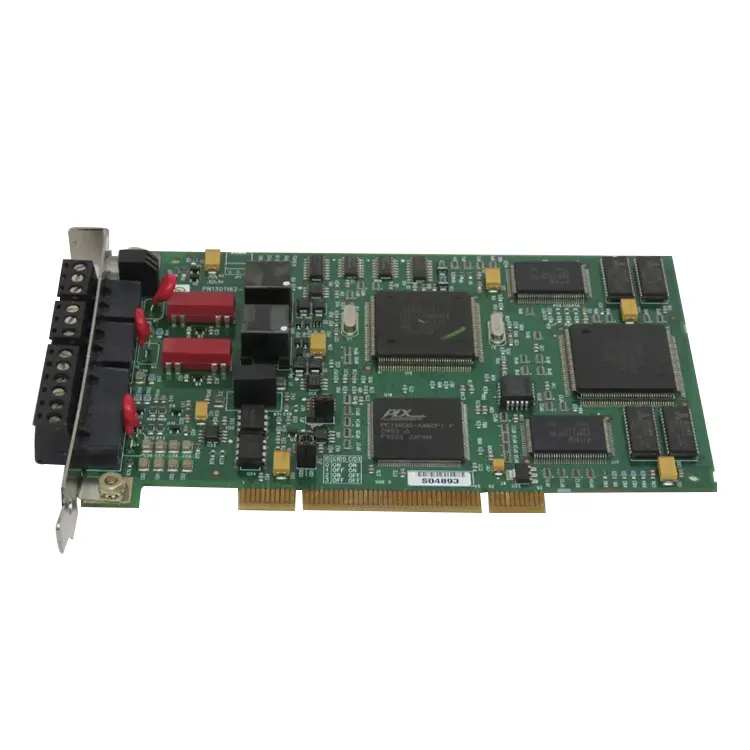
Communication accessories suitable for industrial settings. The Allen Bradley 1784-PKTX is a PCI communication card for desktop computers and industrial control devices. It can be directly installed on desktop computers or industrial control devices, enabling the computer to establish stable communication with workshop PLC equipment.
Whether it's the commonly used DH+ network, RIO remote I/O, or mainstream industrial communication protocols, this network card can be stably adapted to all of them. It is an essential tool for engineers for on-site programming, debugging, monitoring, and data collection. We maintain an ample inventory to ensure that you don't have to wait during emergency maintenance or project debugging, allowing you to quickly resume production.

The most prominent advantage of Allen Bradley 1784-PKTX is its multi-interface, multi-protocol and high compatibility. With just one card, it can meet various on-site communication needs, eliminating the need to install multiple different network cards in the chassis, making the equipment more compact and reducing the failure rate.
It supports various industrial networks such as DH+ and RIO (Remote I/O), and can be quickly configured by pairing with RSLinx Classic software. It has a low usage threshold and strong stability. We only provide brand new original quality, strictly controlling Quality, without refurbishment, repair or hidden defects. Once installed, it can run stably without any problems such as communication interruption, packet loss or connection failure.
The Allen Bradley 1784-PKTX is constructed with a thick fiberglass board base, featuring high hardness and resistance to bending. This design effectively protects the internal circuits. The onboard gold fingers have a thick coating, ensuring strong conductivity, resistance to oxidation, and prevention of contact failure. They remain functional even after repeated insertion and removal. All interfaces are equipped with metal reinforcement structures, making them resistant to repeated plugging and unplugging and suitable for factory high-frequency usage environments.
The guard plate is the Rockwell signature red color, with solid workmanship. Adding a reinforcing guard can firmly fix it to the rear panel of the chassis, preventing loosening or shifting due to vibration or wiring tension. The overall structure is specifically designed for factories with dusty, vibrating, and frequently connected environments. It remains stable and reliable even after long-term operation and can perfectly adapt to various control cabinets and industrial computers in the Factory environment.
Feimu Technology, as a Supplier with a long history in the industrial control industry, has a complete warehousing and testing system. Allen Bradley 1784-PKTX is available in stock and delivered directly throughout the process. It can quickly respond to domestic and international orders.
The price is transparent and reasonable. It is cheap and highly competitive, allowing customers to obtain high-quality communication network cards at a more affordable cost. For logistics, we adopt multi-layer protective packaging including anti-static bags, thick foam, and hard cardboard boxes. It provides full protection against vibration, anti-static, and bending, ensuring that the products can be delivered intact whether by sea or air transportation.
We have a professional technical team that can provide on-machine guidance, driver installation, communication configuration and other support. Please rest assured to make a purchase.
| Parameter | Specification |
|---|---|
| Product Model | Allen Bradley 1784-PKTX |
| Bus Interface | PCI 32-bit (5V slot required) |
| Supported Networks | DH+, Remote I/O (RIO), DH-485 |
| Physical Interface | DB-9 or RJ45 (depending on daughter card) |
| Configuration Software | RSLinx Classic |
| DH+ Transfer Rate | 57.6 kbps |
| RIO Transfer Rate | 57.6 / 115.2 / 230.4 kbps |
| Compatible Processors | PLC-5, SLC 5/04, MicroLogix 1500 (DH+ type) |
| Software Compatibility | RSLogix 5, RSLogix 500 |
| Power Consumption | 5V DC, 500mA typical |
| PCI Compliance | PCI 2.2 or later |
| Operating Temperature | 0°C to 55°C |
| Storage Temperature | -40°C to 85°C |
| Certifications | UL, cUL, CE |
The 1784-PKTX supports three network protocols. Each protocol is used in different applications.
| Network | Speed | Max Nodes | Typical Devices |
|---|---|---|---|
| DH+ (Data Highway Plus) | 57.6 kbps | 64 nodes | PLC-5, SLC 5/04, PanelView |
| RIO (Remote I/O) | 57.6 / 115.2 / 230.4 kbps | 32 nodes | 1771 remote racks, PLC-5 scanners |
| DH-485 | 19.2 kbps | 32 nodes | SLC 5/03, MicroLogix 1200/1500 |
When to use each:
The 1784-PKTX requires both hardware installation and driver configuration. Follow these steps for successful setup.
Hardware installation steps:
Driver installation steps:
Common troubleshooting steps:
The 1784-PKTX has LED indicators on the rear bracket. These provide network status information.
| LED | Status | Meaning | Action |
|---|---|---|---|
| PWR | Green (on) | Card has power. PCI bus is providing voltage. | No action needed. |
| PWR | Off | No power to the card. | Check PCI slot. Check computer power. |
| LINK | Green (on) | Network link is active. Cable connected. | No action needed. |
| LINK | Off | No network link. Cable not connected or no network activity. | Check cable connection. Check device on other end. |
| TX/RX | Flashing | Data transmission active. | No action needed. Normal operation. |
| FAULT | Red | Card fault or communication error. | Check driver configuration. Check cable. Check node address. |
Allen Bradley 1784-PKTX cards are commonly counterfeited. Use these checks to verify authenticity.
Feimu Technology does not ship untested cards. Each 1784-PKTX goes through the following verification process before leaving our warehouse.
How to configure the 1784-PKTX driver in RSLinx?
Start RSLinx Classic, go to the Communications > Configure Drivers menu, select the driver type from the Available Driver Types dropdown list, and then set "Board Address". You can browse the connected DH+ or DH-485 network devices through Communications > RSWho. Technical support can be obtained through us.
What is the main purpose?
It is installed in the standard 5V PCI slot of a personal computer (PC), mainly used to connect the PC to Allen-Bradley's classic industrial network to achieve data acquisition, program upload/download, online monitoring, and fault diagnosis.
Which specific communication protocols and devices are supported?
Network protocols:
Data Highway Plus (DH+), Remote I/O (RIO), DH-485.
Typical devices:
PLC-5 processor, SLC 5/04 processor, MicroLogix 1500 (DH+ type), PanelView classic touch screen, etc.
Software compatibility:
By configuring the driver through RSLinx Classic software, it can work in conjunction with programming software such as RSLogix 5, RSLogix 500.
Address
No. 26, Yuhu Street, Encheng Subdistrict, Enping City, Jiangmen City, Guangdong Province, China
Tel